Shopify Access Token vs API Key: Complete Comparison Guide for 2026
When building Shopify applications or integrations, understanding the difference between Shopify access tokens and API keys is crucial for security and functionality. Both serve different purposes in the Shopify ecosystem, and choosing the right one can make or break your integration. In this comprehensive guide, we'll break down everything you need to know about Shopify access tokens versus API keys, helping you make an informed decision for your project.
Quick Comparison
| Feature | Shopify Access Token | API Key |
|---|---|---|
| Primary Use Case | Server-to-server API authentication | Client-side and public app identification |
| Security Level | High (secret, must be kept private) | Medium (can be publicly exposed) |
| Authentication Type | Bearer token in Authorization header | Query parameter or header-based |
| Scope Management | Fine-grained permission control | Limited scope options |
| Token Expiration | No expiration (revocable manually) | No standard expiration |
| Best For | Custom apps, integrations, backend systems | Public apps, frontend identification |
What is a Shopify Access Token?
A Shopify access token is a secure credential used for server-to-server authentication when making requests to the Shopify Admin API. It's generated when you create a custom app or complete the OAuth flow for a public app. The access token acts as a bearer token, granting your application permission to access specific Shopify store data based on the scopes you've requested.
Access tokens are sensitive credentials that must be stored securely on your backend server and never exposed to the client-side. They provide fine-grained access control through scopes like read_products, write_orders, and read_customers. This granular permission system ensures your application only accesses the data it needs, following the principle of least privilege.
What is a Shopify API Key?
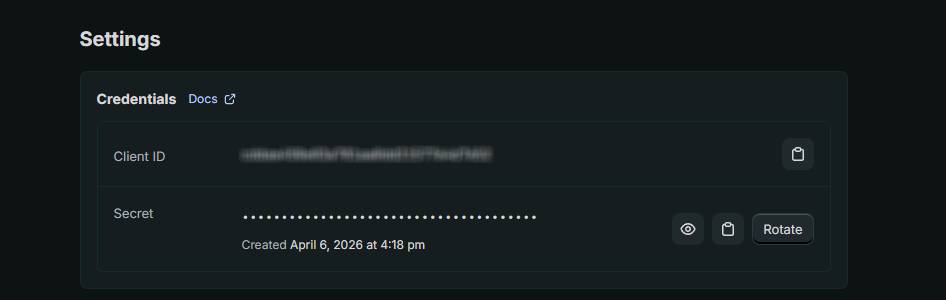
An API key is a public credential used primarily for identifying your Shopify app and making unauthenticated requests to certain Shopify endpoints. Unlike access tokens, API keys are designed to be somewhat public and are often embedded in client-side code. They're commonly used for public apps that require app identification without sensitive data access.
API keys work in conjunction with API passwords (for private apps) or are used independently for public app identification. They're typically passed as query parameters or headers and are used for less sensitive operations that don't require authenticated access to store data.
When to Use Shopify Access Token
You should use Shopify access tokens when building custom apps or integrations that need authenticated access to your Shopify store's sensitive data. If you're creating a backend service that reads customer information, processes orders, manages inventory, or performs any administrative tasks, an access token is the correct choice. Access tokens are essential for any OAuth-authenticated public app that requires user authorization.
Custom apps created in your Shopify admin dashboard automatically generate access tokens that you can use immediately for API calls. These tokens are ideal for private integrations, third-party service connections, and internal business logic that needs to interact with your store. If you need fine-grained permission control through scopes, access tokens are your only option. They're also the recommended approach for any production environment where security is paramount.
Access tokens should be stored in environment variables on your server, never hardcoded or exposed to the frontend. Use them in the Authorization header with the Bearer scheme when making requests to the Admin API. Their permanent nature (until manually revoked) makes them convenient for stable integrations, though you should implement token rotation practices in production systems for additional security.
When to Use Shopify API Key
Use an API key when you're building a public Shopify app that needs to identify itself without requiring sensitive data access, or when you're implementing app installation flows. API keys are useful for frontend identification, analytics tracking, and any public-facing integrations where exposing the key isn't a security concern. They're particularly helpful when you need to reference your app across Shopify's ecosystem.
If you're using Shopify's Storefront API for customer-facing features like product recommendations or checkout integrations, you'll work with API keys rather than access tokens. This separation allows your frontend code to access public data without exposing sensitive administrative credentials. API keys are also used in the initial OAuth authorization request as an identifier for your app before the user grants permissions.
For legacy integrations or specific use cases where Shopify requires app identification without authenticated access, API keys are the appropriate choice. However, modern best practices lean toward using access tokens for nearly all authenticated operations, as they provide superior security and permission control. If you're unsure whether you need an API key, you probably need an access token instead.
Detailed Security Comparison
The security implications of choosing between access tokens and API keys cannot be overstated. Shopify access tokens are secrets that must be treated with the same care as passwords. A compromised access token gives attackers full access to your store based on the token's scopes. They should only be transmitted over HTTPS, stored in secure backend environments, and rotated regularly in production systems.
API keys, while not as sensitive, still require care. Since they can be publicly exposed, they should never grant administrative access to your store. They're designed for scenarios where public identification is acceptable. However, combining an exposed API key with other publicly available information could potentially aid attackers in targeting your app.
The Manual Alternative: OAuth Flow Implementation
If you're building a public Shopify app, you'll need to implement the OAuth 2.0 flow to obtain access tokens. This involves redirecting users to Shopify's authorization endpoint, handling the callback, and exchanging an authorization code for an access token. Here's a simplified example of the server-side token exchange:
const axios = require('axios');

async function getAccessToken(shop, authCode) {
  try {
    const response = await axios.post(
      `https://${shop}/admin/oauth/access_token`,
      {
        client_id: process.env.SHOPIFY_API_KEY,
        client_secret: process.env.SHOPIFY_API_SECRET,
        code: authCode
      }
    );

    const { access_token, scope } = response.data;
    console.log(`Access token obtained with scopes: ${scope}`);
    return access_token;
  } catch (error) {
    console.error('Token exchange failed:', error.response.data);
    throw error;
  }
}

// Usage
app.get('/auth/callback', async (req, res) => {
  const { code, hmac, shop, state } = req.query;

  // Verify HMAC for security
  const message = Object.entries(req.query)
    .filter(([key]) => key !== 'hmac')
    .map(([key, value]) => `${key}=${value}`)
    .sort()
    .join('&');

  const generatedHmac = crypto
    .createHmac('sha256', process.env.SHOPIFY_API_SECRET)
    .update(message, 'utf8')
    .digest('base64');

  if (generatedHmac !== hmac) {
    return res.status(401).send('Invalid request');
  }

  try {
    const accessToken = await getAccessToken(shop, code);
    // Store accessToken securely in database associated with shop
    res.redirect(`https://${shop}/admin`);
  } catch (error) {
    res.status(500).send('Authentication failed');
  }
});
This manual implementation handles the complete OAuth flow, including HMAC verification for security. However, managing this complexity across multiple apps can be challenging, which is why many developers use helper services or libraries to streamline the process.
Our Recommendation
For virtually all modern Shopify integrations, we recommend using access tokens over API keys. They provide superior security, fine-grained permission control, and are the standard for authenticated access in 2026. If you're building a custom app for your own store, generate an access token through the Shopify admin and store it securely in your backend. For public apps, implement the OAuth flow to obtain access tokens from users who install your app.
If implementing OAuth feels complex, services like getshopifytoken.com can simplify the token generation and management process, allowing you to focus on building your integration rather than managing authentication infrastructure. The key is ensuring that whatever method you choose, your access tokens are stored securely, rotated regularly, and used with appropriate scope restrictions. API keys should only be used for non-sensitive public identification purposes, and even then, consider whether an access token would be more appropriate for your use case.
Frequently Asked Questions
Q: Can I use an API key instead of an access token for authenticated requests?
No, API keys are not designed for authenticated access to sensitive data. Shopify's Admin API requires access tokens (bearer tokens) for authenticated endpoints. API keys lack the necessary security and permission control. Attempting to use an API key for authenticated requests will result in authentication failures. Always use access tokens for any operation that requires authorization to access store data.
Q: How often should I rotate my Shopify access tokens?
For production systems, implement token rotation practices at least quarterly or whenever you suspect a token may be compromised. Unlike traditional passwords, Shopify access tokens don't have automatic expiration, so manual rotation is essential for security. In high-security environments, consider rotating monthly or even weekly. For development environments, less frequent rotation is acceptable, but production access tokens should always follow strict rotation policies.
Q: What happens if my access token is exposed?
Immediately revoke the exposed token through your Shopify admin dashboard and generate a new one. An exposed token gives attackers access to your store based on the token's scopes. If the token had administrative scopes, the impact could be severe. This is why access tokens must be stored in secure backend environments and never committed to version control or exposed in client-side code.
Q: Can I use the same access token for multiple Shopify stores?
No, each Shopify store has its own access tokens. If you manage multiple stores, you'll need separate access tokens for each store. This separation is intentional for security and multi-tenancy purposes. Store tokens with clear shop associations and implement proper access controls to ensure tokens are only used with their associated stores.
Q: What scopes should I request for my access token?
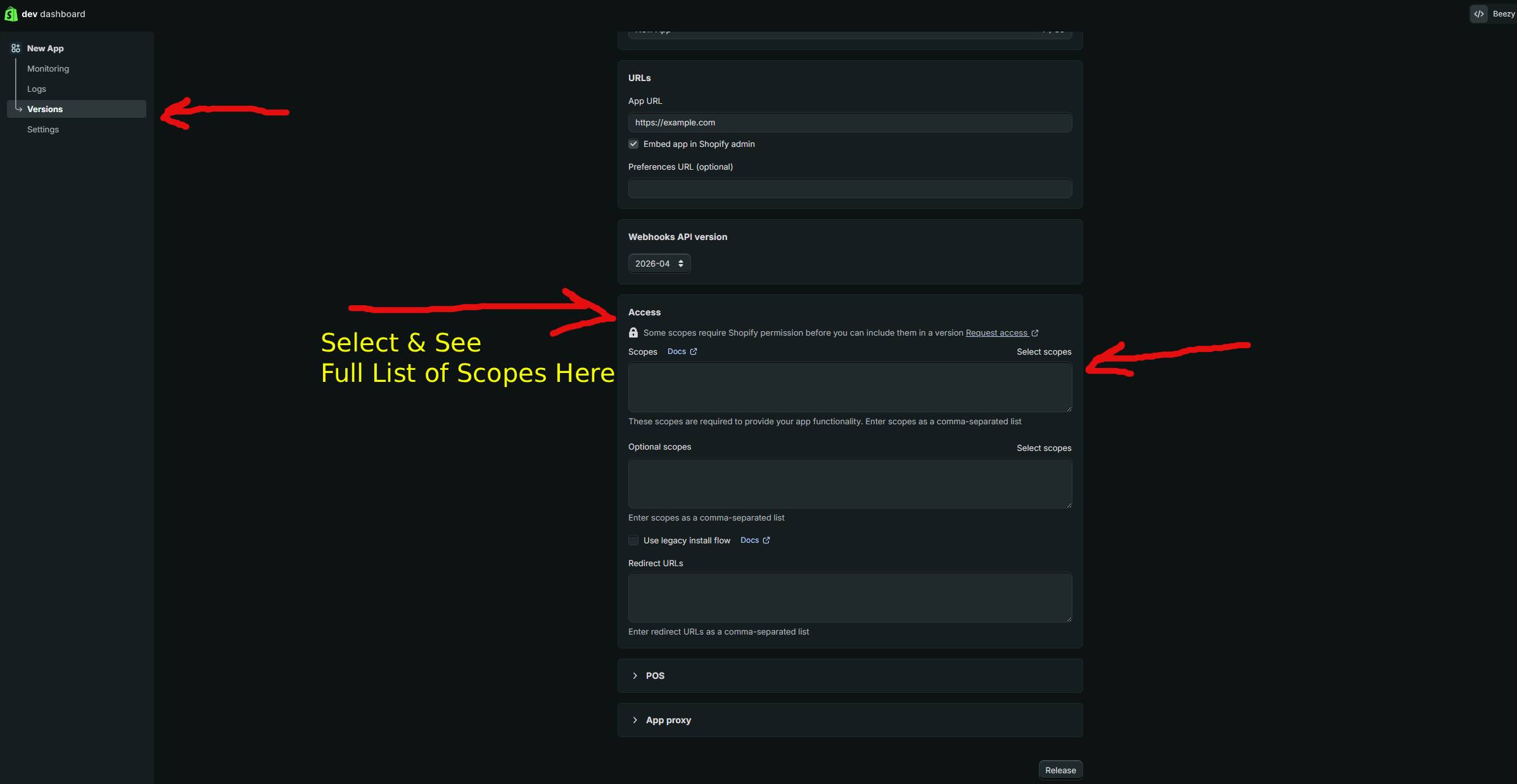
Request only the scopes your application actually needs, following the principle of least privilege. Common scopes include read_products, write_products, read_orders, and write_orders. Review Shopify's scope documentation carefully, and remove scopes from subsequent token generations if you realize you don't need them. Limiting scopes reduces damage from potential token compromise.
Q: Is it secure to store access tokens in a database?
Yes, storing access tokens in a database is standard practice and is more secure than environment variables for multi-tenant applications. Ensure your database is encrypted, use HTTPS for all communications, implement proper access controls, and never log tokens in plain text. Consider encrypting tokens at rest in your database for additional security, though this adds complexity.