Fix: Shopify OAuth Error Invalid_Request The Redirect_URI Is Missing
What This Error Means
The "shopify oauth error invalid_request the redirect_uri is missing" is one of the most common authentication issues developers encounter when building Shopify apps or integrating with the Shopify API. This error occurs during the OAuth 2.0 authorization flow when your application attempts to redirect users to Shopify's authorization endpoint, but the redirect URI parameter is either completely absent, incorrectly formatted, or doesn't match what's registered in your Shopify app settings.
In technical terms, the redirect_uri is a critical parameter in the OAuth 2.0 protocol that tells Shopify where to send the user after they've authorized your app. Without this parameter, Shopify cannot securely return the authorization code to your application, which means your app cannot complete the authentication handshake. This is a security feature designed to prevent malicious applications from intercepting authorization codes.
When Shopify receives your authorization request without a redirect_uri, it rejects the request with the "invalid_request" error code because the OAuth specification requires this parameter for the authorization code flow to work properly. Understanding this error is the first step toward resolving it quickly and implementing proper OAuth authentication in your Shopify applications.
Why You're Seeing This
- Missing redirect_uri parameter: You haven't included the redirect_uri query parameter in your authorization URL at all
- Typo in the parameter name: You've written "redirect_url" or "redirect_uri_" instead of the exact parameter name "redirect_uri"
- Redirect URI not registered: The redirect URI you're using doesn't match any of the URLs configured in your Shopify app's settings
- Protocol mismatch: Your registered URI uses HTTPS but your code is sending HTTP (or vice versa)
- Port number discrepancy: Your localhost testing uses a different port than what's registered (e.g., localhost:3000 vs localhost:8080)
- Trailing slash inconsistency: Your registered URL ends with a slash but your code doesn't include it, or vice versa
- Incorrect URL encoding: Special characters in your redirect_uri aren't properly URL-encoded
- Environment variable not loaded: Your redirect_uri is stored in an environment variable that hasn't been properly loaded or initialized
- Copy-paste errors: You've copied sample code that contains placeholder values instead of your actual redirect URI
How to Fix It
Step 1: Verify Your Shopify App Settings
Log into your Shopify Partner Dashboard and navigate to your app settings. Under the "Configuration" or "App Setup" section, find the "Allowed redirect URIs" field. Note down exactly how your redirect URI is configured. It should be a complete URL including the protocol (https:// or http://), the domain, and any port numbers or paths. For example: "https://yourapp.com/auth/callback" or "http://localhost:3000/auth/shopify/callback".
Step 2: Check Your Authorization URL
Review your application code where you're constructing the authorization URL. Ensure that you're explicitly including the redirect_uri parameter in your request. The parameter must be properly formatted and URL-encoded. Here's what your code should look like:
// Node.js/Express example
const redirectUri = 'https://yourapp.com/auth/callback';
const authorizationUrl = `https://${shop}/admin/oauth/authorize?client_id=${clientId}&scope=${scopes}&redirect_uri=${encodeURIComponent(redirectUri)}`;

res.redirect(authorizationUrl);
Step 3: Ensure Exact URL Matching
The redirect_uri you send in your authorization request must match exactly with what you've registered in your Shopify app settings. This means:
- The protocol must match (http vs https)
- The domain must be identical
- The port number must be the same
- The path must be exactly the same (including trailing slashes)
- Query parameters should not be included in the redirect_uri itself
Step 4: Implement Proper Error Handling
Add logging to your authorization flow so you can see exactly what URL is being sent to Shopify. This helps identify mismatches between your registered URI and what your code is actually sending:
// Express.js example with debugging
app.get('/auth', (req, res) => {
  const shop = req.query.shop;
  const clientId = process.env.SHOPIFY_CLIENT_ID;
  const redirectUri = process.env.SHOPIFY_REDIRECT_URI;
  const scopes = 'write_products,read_orders';

  // Log the values for debugging
  console.log('Shop:', shop);
  console.log('Client ID:', clientId);
  console.log('Redirect URI:', redirectUri);
  console.log('Redirect URI (encoded):', encodeURIComponent(redirectUri));

  const authUrl = `https://${shop}/admin/oauth/authorize?client_id=${clientId}&scope=${scopes}&redirect_uri=${encodeURIComponent(redirectUri)}`;

  console.log('Full authorization URL:', authUrl);
  res.redirect(authUrl);
});
Step 5: Handle the Callback
Create an endpoint that matches your redirect_uri to handle the authorization callback from Shopify. This endpoint receives the authorization code that you'll exchange for an access token:
// Callback endpoint
app.get('/auth/callback', async (req, res) => {
  const { code, hmac, shop, state } = req.query;

  if (!code || !shop) {
    res.status(400).send('Missing required parameters');
    return;
  }

  try {
    // Exchange authorization code for access token
    const response = await fetch(`https://${shop}/admin/oauth/access_token`, {
      method: 'POST',
      headers: { 'Content-Type': 'application/json' },
      body: JSON.stringify({
        client_id: process.env.SHOPIFY_CLIENT_ID,
        client_secret: process.env.SHOPIFY_CLIENT_SECRET,
        code: code,
        redirect_uri: process.env.SHOPIFY_REDIRECT_URI
      })
    });

    const data = await response.json();
    const accessToken = data.access_token;
    // Store accessToken securely for future API calls
    res.send('Authorization successful!');
  } catch (error) {
    console.error('OAuth error:', error);
    res.status(500).send('Authorization failed');
  }
});
Step 6: Test with Localhost
When developing locally, register "http://localhost:3000/auth/callback" (or whatever port you're using) as a redirect URI in your Shopify app settings. Make sure your development server is running on exactly that port. If you need to test on a different machine or access your app from the internet, use a tunneling service like ngrok to expose your local server and register the ngrok URL as your redirect URI.
The 60-Second Fix
If you're in a hurry, here's the quickest path to resolution:
- Check your Shopify app's registered redirect URIs in the Partner Dashboard
- Verify your code includes the exact same redirect_uri parameter in the authorization request
- Ensure the URL is properly encoded using encodeURIComponent()
- Test by logging the exact authorization URL your code generates and comparing it character-by-character with what Shopify expects
If you're still struggling with the OAuth flow after these steps, tools like getshopifytoken.com can automate this step and handle the token management for you, eliminating manual OAuth configuration errors. This is especially useful for rapid development and testing scenarios where you need to quickly obtain valid access tokens.
Common Mistakes
- Forgetting URL encoding: If your redirect_uri contains special characters or spaces, they must be URL-encoded. Always use encodeURIComponent() or equivalent encoding functions to ensure Shopify can parse the parameter correctly.
- Using different URLs in development and production: Many developers register "http://localhost:3000/callback" for testing but forget to update their code when deploying to production, resulting in redirect_uri mismatches in live environments.
- Hardcoding the redirect_uri: Don't hardcode your redirect_uri directly in your code. Use environment variables instead so you can easily change it between development, staging, and production environments without code modifications.
- Including query parameters in the registered URI: Your registered redirect_uri should be just the base URL. Query parameters that Shopify sends (like code, hmac, and shop) are added separately and should not be part of the registered URI itself.
Frequently Asked Questions
Q: Can I have multiple redirect URIs registered for my Shopify app?
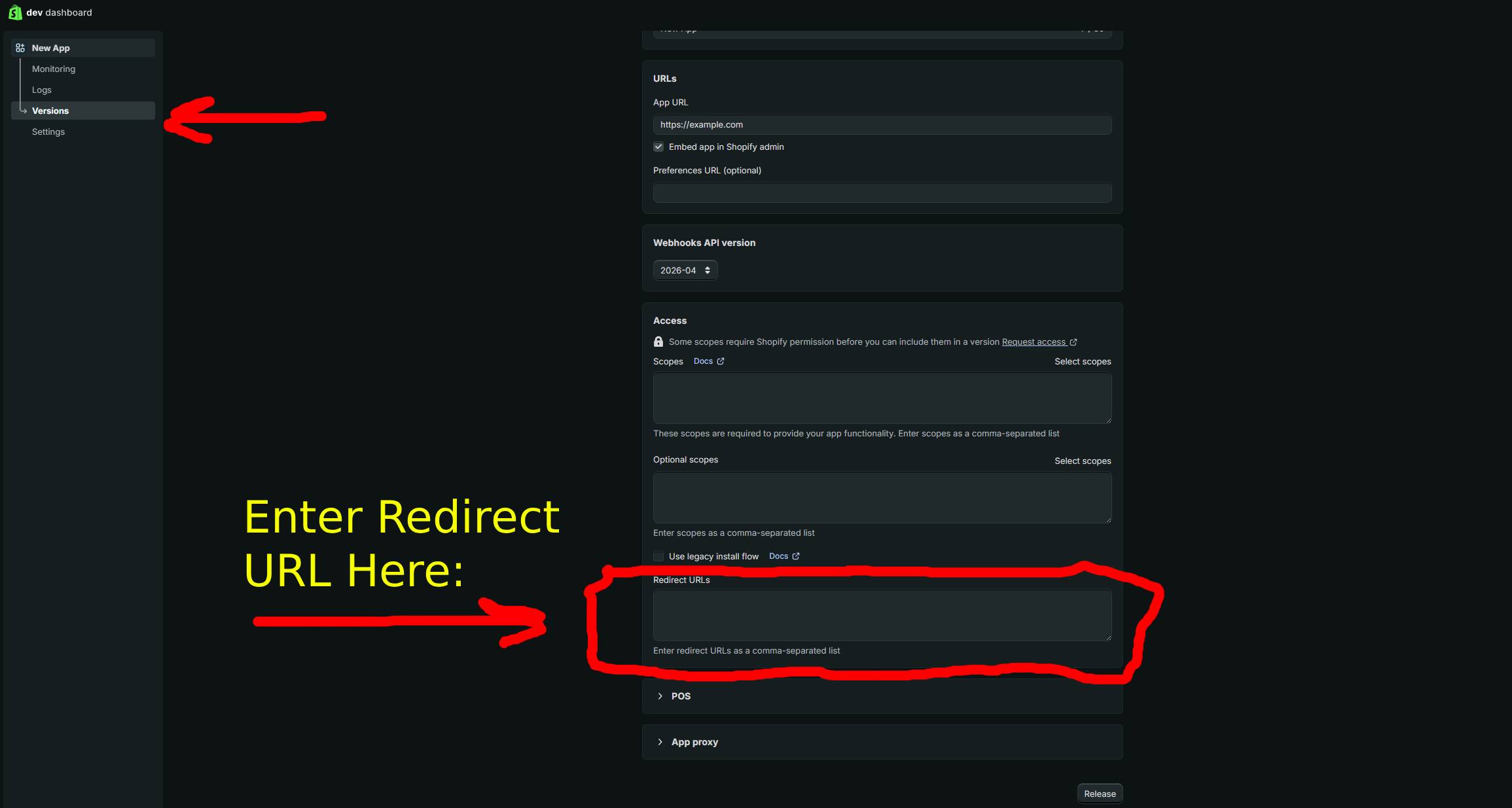
Yes, you can register multiple redirect URIs in your Shopify app settings. This is useful when you have different environments (development, staging, production) or need to support multiple callback endpoints. Just make sure the redirect_uri you send in your authorization request matches one of the registered URIs exactly. Each redirect_uri must be added separately in the app configuration.
Q: Does the redirect_uri need to use HTTPS?
For production Shopify apps, yes, your redirect_uri must use HTTPS. Shopify enforces this security requirement to prevent man-in-the-middle attacks. However, for localhost development (http://localhost:PORT), HTTP is permitted. If you're developing locally and need to test with HTTPS, you'll need to use a tunneling service like ngrok that provides HTTPS URLs for your local server.
Q: What's the difference between redirect_uri and redirect_url?
The OAuth 2.0 specification uses "redirect_uri" (URI, not URL). While these terms are often used interchangeably in casual conversation, Shopify's API expects the exact parameter name "redirect_uri". Using "redirect_url" or any other variation will result in the invalid_request error because Shopify won't recognize the parameter you're sending.
Q: How do I debug OAuth errors if I'm still getting invalid_request?
Add comprehensive logging throughout your OAuth flow to capture the exact values being sent to Shopify. Log the shop name, client ID, scopes, and the complete authorization URL before redirecting. Check your server logs, browser developer tools (Network tab), and Shopify app logs for error messages. If Shopify rejects the request, it will include error details that can point you toward the specific problem with your redirect_uri or other parameters.